

Key takeaways
- Your personal UTR is a 10-digit number printed on the SA250 welcome letter HMRC sends when you first register for Self Assessment.
- The fastest way to find your personal UTR is to log in to your HMRC personal tax account or the HMRC app and check the Self Assessment section.
- Previous Self Assessment tax returns, payment reminders, notices to file and statements of account from HMRC all display your personal UTR.
- If you have lost your personal UTR, call the Self Assessment helpline on 0300 200 3310 or request it through HMRC secure messaging online.
- HMRC will not read your UTR over the phone for security reasons. A replacement letter is posted to your registered address within about 15 days.
Find Your Unique Taxpayer Reference (UTR) Number
Your Unique Taxpayer Reference (UTR) number, also known as tax reference, is a 10-digit identifier given to you by HMRC. It’s like your personal tax ID, used to keep track of your tax records. If you file a Self Assessment tax return, you’ll already have one, and it will remain the same throughout your life.
You might need your UTR number when completing your Self Assessment, speaking to HMRC about your tax affairs, registering as self-employed, or setting up a limited company. Banks, accountants, or lenders may also ask for it when dealing with business or financial matters.
In this guide, we’ll walk you through exactly where to look and how to find your UTR number. Whether you’ve lost it, never received it, or simply don’t know where to check, you’ll get clear, step-by-step advice to help you find out without any hassle.
What is a Unique Taxpayer Reference (UTR) Number?
A Unique Taxpayer Reference, or UTR number for short, is a special code assigned by HMRC to both individuals and businesses for tax-related purposes. This code is essential for helping HMRC keep track of your tax records and ensuring that all your information is linked to the correct account.
If you’re your own boss, running a business, or even just a company director, HMRC assigns you a UTR number the moment you sign up for Self Assessment. Even if you’re an PAYE employee, you could end up with one too, especially if you’ve got some side hustle cash or other income that needs declaring. This UTR number is always 10 digits long with no letters. It never changes throughout your life and is unique to you and your business. Keep it somewhere safe, because when tax stuff pops up, you’ll need it handy.
When You’ll Need Your UTR Number
In many circumstances, particularly when interacting with HMRC or managing your tax obligations, your UTR number is useful. You'll need it most frequently at the following times:
- Registering for Self Assessment - If you're a sole trader or self-employed, or have earnings from other sources outside of PAYE, you'll need to register for Self Assessment. HMRC will issue you with a UTR number as part of the process so they can associate your tax record with your account.
- Filing Your Tax Return - Every time you complete a Self Assessment tax return, you will be requested to provide your UTR number. It's the reference HMRC uses to get your return right and match it to your payments.
- Contacting HMRC About Your Tax Matters - When you phone, write, or use your HMRC online account, you'll frequently be requested for your UTR number. It enables HMRC to quickly locate your records and address your questions or concerns.
- Applying for Certain Business Services or Loans - Sometimes banks, lenders, or even picky clients ask you for your UTR number. Why? They want to make sure you’re actually registered with HMRC, not just winging it. It’s basically their way of checking you’re legit before handing over cash or services.
How to Find Your UTR Number?
Honestly, finding out your UTR number isn’t rocket science. You’ve already got it hiding somewhere in your paperwork, or sitting quietly in your HMRC account. Let’s run through where you can dig it up:
1. Check Your HMRC Correspondence
- Self-Assessment Welcome Letter (SA250) - When you register for self-assessment, HMRC will post you a "Welcome to self-assessment" letter (called an SA250) that has your 10-digit UTR right near the top. It's worth keeping this letter somewhere safe as you'll need that UTR number for lots of things down the line.
- Previous Self Assessment Tax Returns - If you’ve filed a tax return before, your UTR number will be on the paperwork. This includes both online copies and printed versions.
- Payment Reminders or Statements - HMRC often includes your UTR number on statements or payment reminders for your tax bill. These may arrive by post or be available in your online account.
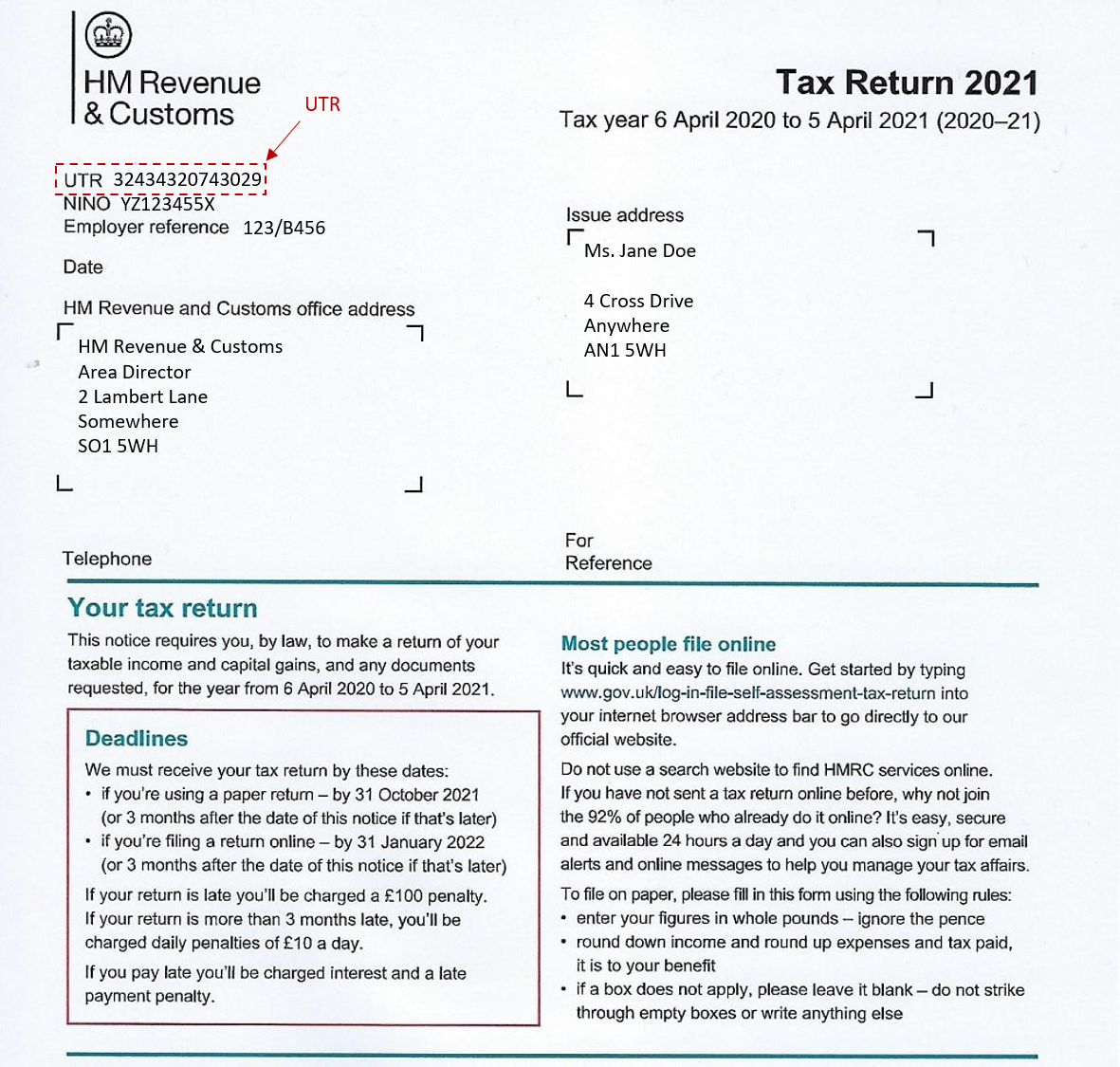
- Notices to File Tax Returns - If you receive official notices to file tax returns from HMRC, your UTR number will be clearly stated within the document for your reference.
- Statements of Account - Your UTR number can also be found on statements of account or any official tax-related documentation provided by HMRC.
2. HMRC Online Account
Visit the HMRC site, input your Government Gateway ID and password, and boom - you’re in. Your UTR usually pops up on your Self Assessment summary. Look for headings like “Your Unique Taxpayer Reference” or just plain “UTR” to see it listed.
3. Check Your HMRC App
You can download the iOS App from the App Store or Android App from the Google Play Store, sign in with your Government Gateway details, select the Self Assessment section from the menu, and Your UTR number should appear clearly on the screen.
Watch the video on how to find your Unique Taxpayer Reference on the HMRC app:
Lost UTR Number? - What to Do?
Misplaced your UTR? No need to stress, HMRC can reissue it, but you will need to verify your identity for security reasons. Here’s the process:
1. Request Your UTR from HMRC
The most efficient approach is through your HMRC online account. Log in with your Government Gateway credentials, navigate to the Self Assessment section, and select the option to request your UTR. HMRC will then send it via post to the address they have on record.
2. Call HMRC
If you prefer, you can contact the Self Assessment helpline at 0300 200 3310 (if you’re in the UK). Be prepared to provide your name, date of birth, National Insurance number, and address for identification purposes.
3. Use Secure Messaging via HMRC Online
Alternatively, you may use secure messaging once logged in to your HMRC account. Simply send a message explaining that you require your UTR, and HMRC will either respond within your account or send the number by post.
4. Online for Limited Company
If you have a limited company, you can request your Corporation Tax UTR Online and HMRC will send your UTR number to the registered business address.
Note: HMRC cannot give your UTR out over the phone for security reasons, so it will take around 15 days to arrive in the post.
Keep Your UTR Number Safe
Your UTR number is basically your tax ID badge in the UK. If you can’t remember where you put it, don’t stress. Check your HMRC letters, any old tax returns, payment reminders, or just log in to your HMRC account or their app. Still can’t find it? Ask HMRC, they’ll post it to you after a quick identity check.
Store that UTR somewhere secure. You’ll need it for Self Assessment, business paperwork, or any conversations with HMRC. Losing it just creates avoidable headaches.
If you’re feeling out of your depth with tax obligations, don’t wing it. Bring in a qualified accountant for self employed or tax advisor. A bit of expert advice can seriously streamline your tax process and keep you on track with those ever-looming deadlines.


