Key takeaways
- MTD for ITSA became mandatory from 6 April 2026 for sole traders and landlords with qualifying income over £50,000. The threshold drops to £30,000 from April 2027 and £20,000 from April 2028.
- Qualifying income means combined gross income from self-employment and property before expenses. Pensions, savings interest and employment income are not counted towards the threshold.
- You must keep digital records using HMRC-compatible software and submit quarterly updates within one month of each quarter ending, covering income, expenses and estimated profit or loss.
- A final declaration replaces the old Self Assessment tax return. It must be submitted by 31 January after the tax year ends, confirming all income, expenses and any adjustments for the year.
- Exemptions exist for digitally excluded individuals, trustees, non-resident companies and certain other groups. Voluntary early sign-up is available for those below the current mandatory threshold.
Key Details for MTD Income Tax 2026
- Who is affected: Sole traders and landlords with combined annual income over £50,000 are now within the first phase of MTD for Income Tax.
- Start date: MTD for Income Tax started on 6 April 2026 and is now in effect.
- What you must do: You must keep digital records, use MTD-compatible software, submit quarterly updates, and complete a final declaration each year with HMRC.
- Future thresholds: The rules will expand to those earning over £30,000 from April 2027, and over £20,000 from April 2028.
- Action required now: You should already be using compliant software and keeping digital records. If not, you need to get set up as soon as possible to stay compliant and avoid penalties.
MTD for Income Tax - What This Change Means for You Now
Making Tax Digital for Income Tax Self Assessment, MTD for Income Tax, or MTD for ITSA, is now live from 6 April 2026. It has changed how sole traders and landlords report their income to HMRC. Instead of sending in one paper tax return each year, those under the new rules must keep digital records and submit updates every quarter using HMRC approved software. This is compulsory. It’s a big move away from spreadsheets and boxes of receipts.
The rollout is already started from April 2026, with individuals earning over £50,000. Over the next two years, it will expand to those earning over £30,000 and then £20,000. If you fall within the first group, you should already be keeping digital records and preparing for your first quarterly submission.
Why is this important? Because HMRC is changing how it collects and reviews tax information. With quarterly digital updates, they’ll get a clearer and more regular view of your income and expenses, instead of waiting for one annual return. For many sole traders and landlords, this means adjusting your routine, choosing new software, and rethinking how you plan your taxes.
If you’re not set up yet, it’s important to act now. If you get ready early, you can have enough time to choose the right tools, organise your digital records, and fully understand what HMRC needs from you. By the time MTD for ITSA applies to you, you’ll already be set up. If you want to stay in control of your tax position and avoid last-minute stress, start getting ready early. It just makes sense.
Disclaimer
This article is for general information only and is based on current HMRC guidance as on 19th January, 2026. Tax rules and Making Tax Digital requirements can change, and how they apply will depend on your personal circumstances. The content does not replace professional advice. For advice tailored to your situation, it is best to speak with a qualified accountant or tax adviser.
This information is current as of April 07, 2026 and based on:
- Finance Act 2024
- HMRC Guidance (Updated December 2025)
- Making Tax Digital Regulations 2021 (Amended 2024)
What is Making Tax Digital for Income Tax Self Assessment
Making Tax Digital for Income Tax Self Assessment or MTD for ITSA has changed how sole traders and landlords keep records and report income tax to HMRC. Instead of rushing once a year to gather all your figures, you’ll now keep digital records of income and expenses and send updates to HMRC throughout the year.
The main idea is to move tax reporting into the digital age. You need to use compatible accounting software to keep your records and send regular updates straight to HMRC. These updates show how your business or rental income is performing across the year, rather than only at the end of it. This means you’ll always know your tax position, not just at year end, but all along.
If are into VAT returns, this will sound familiar. MTD for ITSA is basically following the same model as Making Tax Digital for VAT. VAT-registered businesses already use approved software to file VAT returns. Now, income tax is going the same way, with digital requirements for self-employed and landlords.
The main purpose of HMRC is to completely shift to digital record-keeping and reporting. HMRC wants more accurate information, sent more frequently, straight from your software and not from stacks of paper or last-minute spreadsheets. This reduces errors, gives everyone clearer insights, and brings income tax up to date with modern business practices.
All of this is part of a wider plan to digitise the UK tax system. HMRC is shifting from paper based processes to real-time data. The ultimate aim? Simpler, more predictable tax reporting for both taxpayers and HMRC.
MTD for ITSA replaces the old annual Self Assessment return with digital quarterly updates. You’ll need to use HMRC-approved software for this, and at the end of the year, you’ll submit a final return. For many sole traders and landlords, this is the biggest change to income tax reporting in years and it’s smart to prepare early.
Making Tax Digital Timeline
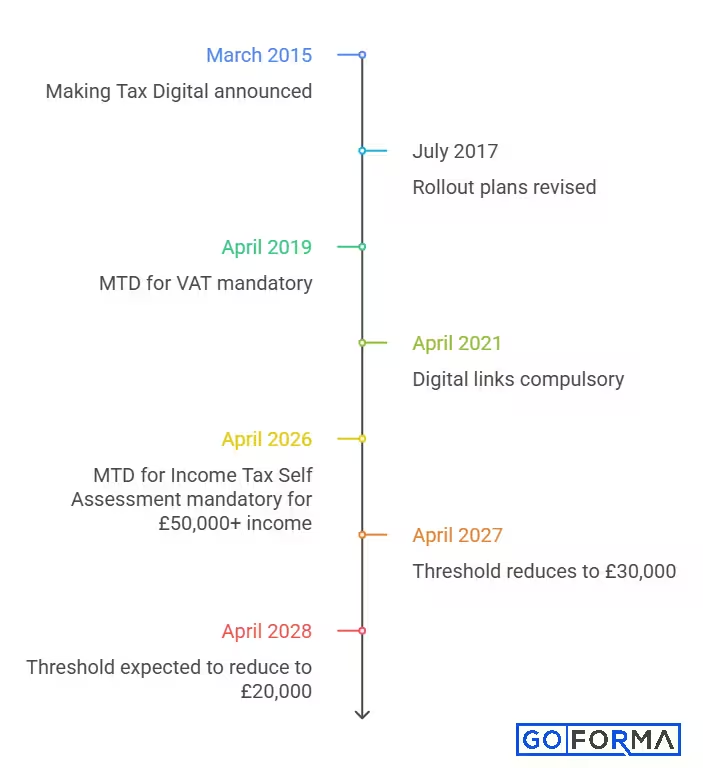
- March 2015 Making Tax Digital was first announced in the Spring Budget.
- July 2017 The original rollout plans were revised following concerns raised by professional bodies and businesses.
- April 2019 MTD for VAT became mandatory for businesses with taxable turnover above the VAT threshold, which was £85,000 at the time.
- April 2021 Digital links became compulsory as part of MTD for VAT compliance.
- April 2026 MTD for Income Tax Self Assessment is now live and becomes mandatory for sole traders and landlords with qualifying income over £50,000.
- April 2027 The threshold reduces, bringing in sole traders and landlords earning over £30,000.
- April 2028 MTD for Income Tax Self Assessment is expected to apply to those earning over £20,000, subject to legislation.
- What’s next HMRC is expected to confirm further phases of the MTD rollout in due course.
Who is Affected by MTD for Income Tax?
Making Tax Digital for Income Tax Self Assessment (MTD for ITSA) is now being rolled out in stages, based on your income level and source of income.
If you earn from self-employment, property, or both, this applies to you either now or very soon.
- MTD for ITSA mainly affects people who already file Self Assessment tax returns because they run a business or get rental income.
- Sole traders: If you’re self-employed and earning over £50,000, you are now within the first phase of MTD. You should already be keeping digital records and preparing for quarterly submissions.
- Landlords: If you receive income from residential or commercial property, you are included. It doesn’t matter whether you own one property or several. If your rental income crosses the threshold, MTD applies.
- Mixed income individuals: If you earn from both self-employment and property, HMRC looks at your combined qualifying income. This total determines whether you fall within MTD and when you must comply.
In short, if you currently submit a Self Assessment tax return for business or property income, there’s a strong chance MTD either already applies to you or will apply soon as thresholds reduce.
If you’re unsure where you stand, now is the time to assess your eligibility and make sure you’re set up correctly.
Making Tax Digital for Income Tax Qualifying Income
Making Tax Digital for Income Tax Self Assessment (MTD for ITSA) is now in force for eligible sole traders and landlords. If you meet the income threshold, you must keep digital records and submit quarterly updates to HMRC using approved software.
- From 6 April 2026, MTD applies if your total qualifying income exceeds £50,000. This includes combined income from self-employment and property, calculated before tax.
The scope will expand over the next two years:
- From April 2027, the threshold reduces to £30,000
- From April 2028, it is expected to reduce further to £20,000 (subject to legislation)
If your income goes above or below these income thresholds, the timing can affect when you must comply. That is why keeping accurate records throughout the year and planning ahead is essential.
Example: Combined income for threshold tests
If your 2024 to 2025 tax return showed combined self‑employment and property income of £53,000, this would put you above the first MTD threshold. You should now be keeping digital records and preparing for quarterly submissions.
Example: Using the Rent‑a‑Room scheme
If you used the Rent‑a‑Room scheme and declared £55,000 of UK property income in 2024 to 2025, you would still need to create digital records for all your property income, even the part covered by Rent‑a‑Room, in the 2026 to 2027 tax year.
According to gov.uk, around 780,000 people with business or property income above £50,000 are already shifted to MTD for ITSA from April 2026. A further 970,000 individuals are set to join from April 2027.
Voluntary Early Adoption of MTD for ITSA
Although MTD is now mandatory for those above £50,000, you can still choose to adopt it early if you fall below the current threshold.
Starting early can make things easier. You get extra time to learn about digital record keeping and quarterly updates. You can try out different software, see what works for you, and sort out any issues before the deadlines carry real consequences.
In fact, many people who sign up early find that the transition is much smoother. It gives your self-employed accountant time to set everything up correctly and integrate your records with HMRC well before MTD becomes mandatory.
Exemptions from Making Tax Digital for ITSA
If you qualify for an exemption, you don’t have to use Making Tax Digital (MTD) for Income Tax Self Assessment. However, this doesn’t mean you are free from your tax responsibilities. You’re still required to report your income and gains through a standard Self Assessment tax return.
HMRC sets out different types of exemption, depending on your personal circumstances, income level, and the type of tax return you file.
Types of exemption
There are two main types of exemption from MTD for ITSA:
A permanent exemption means you don’t have to use MTD unless something significant changes in your situation.
A temporary exemption means you’re not required to follow MTD rules until at least the 2027 to 2028 tax year.
Based on information HMRC already has about you, some exemptions are granted to you automatically. Others require you to contact HMRC and apply, along with supporting evidence.
Permanent exemptions
Permanent exemptions usually apply automatically and remain in place unless something changes.
If you’re “digitally excluded”, you may need to apply for a permanent exemption. This applies where it is not reasonable for you to use accounting software to keep digital records or send quarterly updates and tax returns. This could be due to health issues, disability, age related factors, or lack of access to reliable internet services.
If your qualifying income is £20,000 or less, you don’t need to worry. MTD for ITSA doesn’t apply, and you don’t have to do anything.
Automatic permanent exemptions
You are automatically exempt from MTD for income tax and cannot sign up if you fall into one of the following categories:
- You do not have a National Insurance number
- You submit a tax return as a trustee, including charitable trustees and trustees of certain pension schemes
- You submit an Income Tax return for a non resident company
- You are a Lloyd’s member with no self employment or property income
- You act as a personal representative for someone who has died
- You submit a tax return on behalf of someone else because you hold lasting or enduring power of attorney, or you have been appointed by a UK court due to their lack of mental capacity
Temporary exemptions until April 2027
Some individuals are exempt from MTD for ITSA until April 2027. After that, if your qualifying income is above £30,000, you may have to use MTD.
You’re automatically exempt until April 2027 if your 2024/25 tax return includes any of the following:
- You claimed averaging relief
- You claimed qualifying care relief (like foster care)
- You received income from trusts or estates
If these aren’t in your 2024/25 return but you expect them for 2026/27, you’ll need to apply for a temporary exemption.
Non-UK resident entertainers and sportspersons must apply for a temporary exemption until April 2027, even if this income appeared on previous tax returns.
Temporary exemptions for international tax rules
You might be eligible for a temporary exemption until April 2027 if your tax return includes (or is expected to include) the SA109 supplementary page. This generally applies to non-UK residents, people who are tax resident elsewhere, or those claiming overseas workday relief, split-year treatment, or foreign income and gains.
Sometimes this exemption is automatic, but in other cases, you’ll need to apply to HMRC, depending on your situation.
Temporary exemptions beyond April 2027
Some groups will continue to be exempt beyond April 2027, although HMRC hasn’t announced when MTD will begin for them.
You’re automatically exempt if your 2024/25 tax return was filed as:
- An employed minister of religion
- A recipient of the Married Couple’s Allowance (born before 6 April 1935)
- A recipient of the Blind Person’s Allowance
- A Lloyd’s member with self-employment or property income
If this didn’t apply in 2024/25 but will in 2026/27, you’ll need to apply for an exemption.
How the MTD for ITSA Process Works
Making Tax Digital for Income Tax isn’t actually as tricky as it might look at first glance. Once you get used to how it works, planning and staying on top of things becomes much easier.
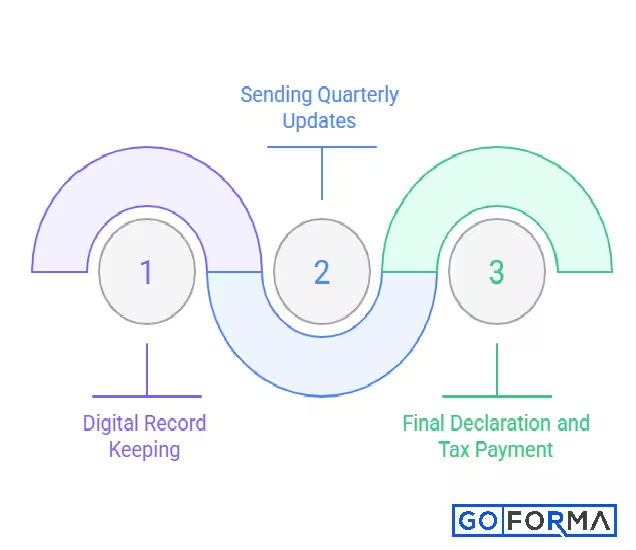
The whole process comes down to three main steps:
1. keeping digital records
2. submitting quarterly updates
3. making a final declaration when the tax year ends
1. Digital Record Keeping
Digital record keeping is the core of MTD for ITSA. HMRC wants you to keep all your business or property records in a digital format, and you’ll need to use compatible software.
By “digital records,” they mean all the details about your income and expenses such as sales, rental income, allowable costs, and the transaction dates. You must keep records electronically and store in software that can integrate directly with HMRC systems.
Just using spreadsheets isn’t enough for most people anymore. You can still use them, but only if they connect to HMRC through approved software. Manually typing numbers into the HMRC portal isn’t allowed under the new rules. The data has to move straight from your records to HMRC, all digitally, with no manual entry.
That’s why choosing the right software from the start really matters. The right software keeps your records organised, saves you time, and helps prevent mistakes. You can use HMRC tool to find software that meets your needs for Making Tax Digital for Income Tax.
Example: Separate digital records and quarterly updates
If you have more than one source of income, you must treat them separately for digital records and quarterly updates. For example, an electrician and driving instructor who runs two separate sole trader businesses must keep separate digital records for each business and send quarterly updates for both. This means you manage your records by income source rather than mixing everything together.
Example: Multiple properties in one business
For landlords, you can treat all UK properties as one property business. If you have multiple lets in the UK, you keep one set of digital records for all UK property income and expenses and send quarterly summaries for that single property business.
2. Sending Quarterly Updates
Instead of just sending in one tax return at the end of the year, you’ll now send updates every three months.
Each one covers a quarter of the year, starting in April:
- 6 April to 5 July (due by 7 August)
- 6 April to 5 October (due by 7 November)
- 6 April to 5 January (due by 7 February)
- 6 April to 5 April (due by 7 May)
After each quarter ends, you have one month to send that update to HMRC. These updates give HMRC a snapshot of how much you’ve earned and spent so far.
If it suits you better, and your software supports it, you can choose to align your update periods with the end of each month. This option is often referred to as a calendar quarters. Once chosen, your reporting periods will run as follows:
- 1 April to 30 June (due by 7 August)
- 1 April to 30 September (due by 7 November)
- 1 April to 31 December (due by 7 February)
- 1 April to 31 March (due by 7 May)
Note that the submission deadlines stay the same.
You must make this choice before sending your first update for the tax year you want it to apply to.
Each quarterly update must include your total income, your total allowable expenses, and your estimated profit or loss for that quarter. Don’t worry, you’re not paying tax every quarter. The main advantage is that you get a clearer idea of your tax position as the year goes on.
For multiple source of self-employment and/or rental income
If you fall within Making Tax Digital for Income Tax and have more than one source of income, the reporting rules are stricter.
Where you have both self-employment and rental income, or more than one self-employed business, you must send separate quarterly updates for each income source. This means reporting income and expenses individually for every self-employment, as well as separate quarterly updates for property income and costs. The only exception is where a property income easement applies, such as certain jointly owned properties.
If you receive rental income from both UK and overseas properties, the reporting must also be split. All UK property income is reported together in one set of quarterly updates, while foreign rental income must be reported separately.
This approach helps keep each income stream clear and correctly reported under Making Tax Digital.
Examples:
Suppose in your 2024/2025 tax return you claimed a trading income allowance and showed property income of £60,000 and self‑employment income of £1,900. In the 2026 to 2027 tax year, you would need to keep digital records of both property and self‑employment income because your property income exceeds the allowance threshold.
A landlord with turnover under £90,000 can report the total rental income and total expenses for the quarter, rather than sending every single transaction.
3. Final Declaration and Tax Payment
After the tax year ends on 5 April, you send in your final declaration. This is where you confirm all your income, expenses, and any last adjustments for the tax year. This final declaration replaces your old Self Assessment tax return.
You have until 31 January after the tax year ends to submit this declaration and pay any tax you owe.
The quarterly updates lead into the final stage. They build the foundation, and the final declaration pulls everything together to confirm the final figures.
How to Prepare for MTD for ITSA Right Now
MTD for Income Tax is already live for many taxpayers. If you’re not fully set up yet, now is the time to act.
Getting this right early will save you time, reduce errors, and help you avoid penalties. The key is to move from last-minute filing to consistent, digital record keeping.
Step by step checklist
- Check your qualifying income Review your total income from self-employment and property.
- Confirm if MTD applies to you now Compare your income against current thresholds to see if you should already be compliant.
- Choose MTD-compatible software Use HMRC-approved software that fits your business and is easy to manage day to day.
- Start keeping digital records immediately Record income and expenses as they happen instead of leaving it until year end.
- Stay consistent with bookkeeping Regular updates make quarterly submissions much easier and more accurate.
- Sign up for MTD for ITSA (if not already done) Sign up for MTD for Income Tax and connect your software to HMRC.
- Plan your quarterly submissions Add deadlines to your calendar so nothing is missed.
- Prepare for the final declaration Don’t forget the year-end submission, which is still required alongside quarterly updates.
Get help from accountants
Bringing in a professional is a smart move when you’re shifting to MTD for ITSA. A Making Tax Digital accountant or agent can manage the technical details, review your records, and take care of those regular submissions for you.
Letting a specialist handle things takes a lot of pressure off you. Plus, they know exactly what HMRC expects and how to report everything properly. They’ll spot any issues before they become bigger problems and help you manage your tax planning all year round.
With the right support, MTD for ITSA becomes a structured process rather than an added burden. If you want peace of mind and more time to focus on running your business, teaming up with an accountant just makes sense.
GoForma Support for MTD for Income Tax Self Assessment
Making Tax Digital for Income Tax is now live, and getting it right from the start is essential. GoForma helps you stay compliant without confusion, stress, or missed deadlines.
We guide you through the full setup, starting with choosing the right MTD-compatible accounting software based on how you work and the type of income you earn.
We believe in using smart technology to make tax easier. That’s why we’re a FreeAgent Platinum Partner. FreeAgent is HMRC-approved, fully compliant for MTD for ITSA, and we include it free with all our accounting packages, so you keep more of your money instead of spending it on software every year.
GoForma takes care of your quarterly updates. Our team of sole trader accountants reviews your records, prepares your figures, and submit regular updates to HMRC on time. You always have a clear, up-to-date view of your income and expenses, without the pressure of doing it yourself.
With GoForma, we offer Making Tax Digital for Income Tax to sole traders and landlords with which they get expert advice, reliable reporting, and support from people who understand both the MTD rules and the reality of running a business or managing property income.
If you want a smooth start and a clear plan, book a free consultation with us today. We’ll create a personalised MTD readiness plan based on your income, your goals, and your timeline.